

Adobe Firefly Custom Models Go Public
Creators can now train AI on their own assets, keeping style consistent, branded, and fully under their control

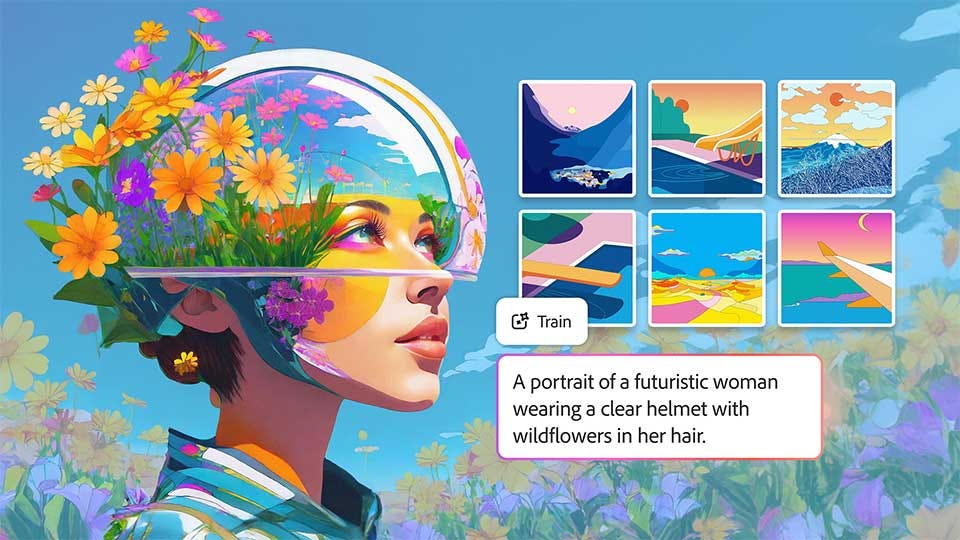
This year, Adobe Firefly turns three, and it looks very different from its public beta launch. What started as a hub for the company’s generative models has evolved into something broader: a platform that brings together both Adobe and third-party models, giving creative professionals a single place to choose the right engine for the job. Today, Adobe is taking another step forward by announcing support for custom models in Firefly.
“A creator’s style is their signature. For creative pros and brands, it’s their identity,” Deepa Subramaniam, Adobe’s vice president of product marketing for Creative Cloud, writes in a blog post. Indeed, but while third-party models can help creatives speed up workflows, they rarely capture a creator’s unique style perfectly and at scale. Models like Firefly, Google’s Nano Banana, Luma’s Ray2, and Runway’s Gen-4 are designed as versatile, general-purpose engines capable of generating a wide range of images, but they aren’t inherently tailored to any one creator’s signature.
“To grow a brand, you need a steady stream of assets that consistently express who you are. Those assets should be yours and yours alone,” Subramaniam states. And that’s where Firefly Custom Models are the most valuable. Creatives can use their existing assets to train a model that reflects their work, which will live within the Firefly platform. The creator will retain ownership of the model, and it will be private by default, so there should be no risk of others infringing on their style or brand identity.
Adobe first introduced the concept of Firefly Custom Models in March 2024. At that time, it was intended to help enterprises train and customize models. Then, in October, it became more widely accessible to any creator through a private beta. Four months later, Adobe is now removing most restrictions and promoting Custom Models to a public beta.
Firefly Custom Models are fine-tuned for three distinct creative areas. The first is characters, designed to generate people, creatures, or fictional figures—ideally with the right number of fingers and recognizable facial features. The second is illustration, focused on producing hand-drawn or stylized artwork that captures the nuance of traditional or digital art styles. This is where stroke weight, fills, and color consistency are important. Finally, there’s photography styles, designed to replicate a specific visual look consistently across multiple images.
“Instead of starting from scratch each time, your trained model becomes a reusable foundation you can build on again and again,” Subramaniam attests.
Creating a custom model in Adobe Firefly will cost 500 credits, and there are no refunds if training is canceled. It starts on the Firefly homepage, where the creator chooses one of the preferred use cases mentioned above. Then, they upload between ten and 30 JPG or PNG images with a maximum 16:9 aspect ratio and a resolution of at least 1,000 pixels to train the model (see best practices). You must affirm that you have the rights and permissions for the assets you’re using. Adobe will then generate a training set score and suggestions for improving the model’s ability to produce higher-quality results. The company advises that achieving a model score of 85 or higher is ideal.
From there, Firefly will generate the model’s metadata, including the title, description, concept, sample prompt, tags, and captions. Adobe estimates that training could take anywhere from 30 minutes to a couple of hours, depending on the custom model’s complexity and how many models are being trained at the time.
Although Custom Models are private by default, creative professionals can choose to share them with others in Firefly and Firefly Boards. This requires users to enter the email addresses of those being granted access. Each model can only be trained once, though images from an existing model can be reused to train a new one.
The potential of custom models in Adobe Firefly is huge. Creators can leverage these specialized AI tools for everything from YouTube videos—thumbnails, cover art, in-video images—to marketing and sales assets, social media campaigns, presentations, and more. At their core, Firefly Custom Models are about maintaining consistency, ensuring quality, and speeding up the creative process. You’re no longer wasting time or tokens going back and forth trying to get images just right.
It’s something Subramaniam agrees with: “For teams producing high volumes of content, that consistency becomes a competitive advantage.”
Beyond Custom Models, Adobe is also sharing that more third-party models are being added to Firefly. To date, creators can work with more than 30 LLMs, including Google’s Nano Banana 2 and Veo 3.1, Runway’s Gen-4.5, Kling’s 2.5 Turbo, and Adobe’s own Firefly Image Model 5, which is now generally available.
And there’s one more thing: Remember Project Moonlight, Adobe’s experiment with agentic conversational assistants? Introduced at last year’s Adobe Max conference, Project Moonlight is its take on having an AI assistant that works across all Creative Cloud apps, specifically Photoshop, Express, and Acrobat.
“Describe what you want to accomplish in a chat, and agents work with you to execute that vision using Adobe’s iconic tools—taking real actions you can refine, adjust, and build on,” Subramaniam explains.
That said, this isn’t Adobe’s first foray into chat-assisted workflows—in December, its signature apps would now run natively within ChatGPT for free.
Project Moonlight is now in private beta, with Adobe opening it to additional testers, though a full launch date is still uncertain.